top of page

Haptap Call Analytics

Haptap Call Analytics allows you to deep dive into the inner workings of your Teams Phone System, including customer satisfaction insights and analysis of how your agents' performances stack up. It captures and tracks call data from internal calls, inbound calls and outbound calls.

Haptap Call Analytics delivers a suite of preconfigured and customizable reports to deliver insight into company calling usage and performance:

Company Summary

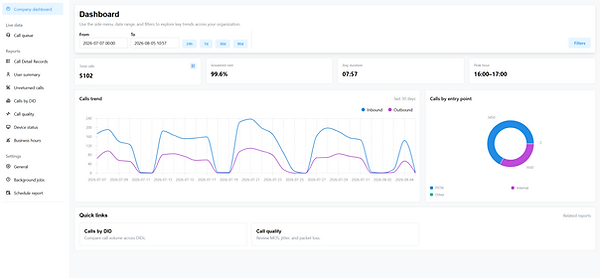
The Company Summary dashboard provides a high-level overview of your business phone system usage. Using these metrics, you can analyze inbound and outbound traffic patterns and adjust your business hours to serve your customers.

analytics_edited.jpg

Extension Summary

The Extension Summary report provides a detailed summary of call activity for any extension. Using this report, you can track the number of answered, abandoned and missed calls for each Teams Phone user

Call Detail Records

The Call Detail records provide historical information about all (internal, inbound and outbound) calls processed in the time frame the user selects.

analytics_edited.jpg

Active Calls Report

The Active Calls report provides a real-time list of calls that are currently active across the company, which is useful for call queue supervisors, managers and agents.

Unreturned Calls Report

The Unreturned Calls report shows a list of unanswered numbers that called into your Teams phone system.

analytics_edited.jpg

Calls by DID Report

The Calls by DID report tracks incoming call activity to phone numbers. Users are able to see how many calls each of these phone numbers receives

Call Quality Report

For IT personnel who need to ensure their organization’s calls meet the level of quality expected from Teams Phone, the Call Quality report gives a variety of important insights. It reviews voice quality scores to ensure good audio quality, balanced call volume and also analyzes call quality trends to generate related reports.

analytics_edited.jpg

Call Queue Report

The Call Queue report provides real-time and historical metrics for a call queue such as the number of agents waiting to serve the queue, number of calls waiting in the queue, waiting time, number of calls answered so far, and more. The report consists of four sections: Queue Board, Queue Listing, Queue Detail and Call Queue Data.

Ring Groups Report

The Ring Group dashboard provides a real-time view of all call activity in any designated Ring Group. Using these stats, you can monitor the performance of agents assigned to the ring group. This report presents call details of all calls processed by the ring group. You can view all attempted calls or filter to view only the answered calls.

analytics_edited.jpg

Employee Activity Report

The Employee Activity report is an excellent tool for administrators or managers to quickly view the Teams Phone activity of users  at a glance.

Schedule Report

Email reporting allows a user to schedule reports to be sent on a regular basis to either archive data or simplify data gathering, and get updates on agents’ activity and effectiveness.

analytics_edited.jpg

Business Hours

The Business Hours report displays the total number of inbound calls during and after business hours for each day. In order to access the report, you’ll have to set up your business hours in the Haptap Call Manager

bottom of page