Haptap Call Analytics
Microsoft Teams Phone gives your business a powerful calling platform. Haptap Call Analytics tells you how well it is working.
Call Analytics is a premium add-on to Haptap Call Manager. It provides a comprehensive suite of pre-built and customisable reports covering your entire Teams Phone environment, from live call queue performance to historical agent activity, call quality, and business hours analysis.
A fully integrated reporting tool, delivered with one-click in a few second. 30 days of data is loaded into each new customer, so analytics is working hard from day-one.
Ready to see it in action?
For Partners. Built for Teams. Delivered in your brand.
Deployed with one click.
Call Analytics runs entirely within your white-label environment, so your customers and end users see your brand throughout, with no reference to Haptap
Overview of Haptap Call Analytics Features
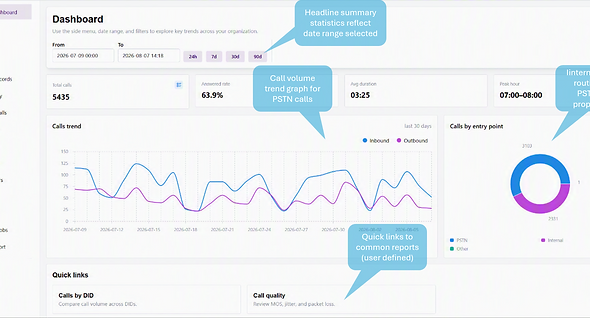
Company Summary at a Glance
A headline view of your company's phone activity. See the numbers that matter at a glance, then jump straight into detailed reports to drill into specific performance areas.
Live Call Queue Status
Real-time and historical metrics for every call queue, including agents available, calls waiting, wait times and calls answered so far. The view auto-updates, giving managers a live picture of queue performance.

Call Detail Records (CDR)
Historical detail on every internal, inbound and outbound call, filtered by user, group and time period. Export CDR data in CSV format whenever you need further analysis.

Unreturned Missed Calls
Identify missed calls that were never called back. See which callers are still waiting for a response, so your team can recover lost opportunities before they go elsewhere.

User Activity Summary
Detailed call activity for every user across your organisation. A per-user breakdown of answered calls, outbound calls, missed calls, total talk time and average talk time.

Business Hours Analysis
Compare inbound calls during and after business hours, using your company's timezone and weekly schedule. Spot demand outside your opening hours and decide whether your cover matches it.

Calls by Number (DID)
Track incoming call activity by phone number and voice app, grouped by destination line or resource. See at a glance your busiest numbers, queues and users.

Call Quality Monitoring
Visibility of call quality indicators across every Teams Phone call. Identify trends and diagnose issues affecting a single user or an entire building location.

Device and Endpoint Status
Teams softphone clients, Mobile users and Phone endpoints seen with call activity and device categories.

Scheduled Email Reports
Schedule any report to be emailed on a regular cadence. Data gathering and archiving take care of themselves, with reports landing in the right inboxes automatically.

Powerful Filtering
The same filter panel is available on every report: user, group, call duration, audio quality, success or failure, and more.

Call Analytics:
Everything Teams Phone Should Have Told You
Live queues, historical reporting, call quality and scheduled reports, all in the Call Manager platform your team already uses to manage Teams Phone. Nothing to deploy and nothing to export.
For partners, it all runs under your brand, giving your customers real calling insight and giving you a premium add-on on every tenant.
Want to see it on your own numbers? Book a call.